ChatGPT Fantasy World Scene Prompts
 CHATGPT PROMPTSFANTASY WORLD SCENE8 COPY-PASTE PROMPTS
Fantasy art works when it feels like a place you could walk into, the way a good Amar Chitra Katha panel or a school-bench doodle of a secret fort does. A thoughtful fantasy scene prompt gives ChatGPT a focal point, a sense of scale, a light source and a mood, so the picture is more than a pile of magical objects.
We think in three layers: foreground, middle and background. Add one tiny human or animal figure for scale, and you instantly get depth. We also avoid existing franchises and use original ideas.
Great for story covers, wallpapers, game ideas or just daydreaming.
- Copy-Paste Prompts
- One focal point, three details and a tiny figure: building a fantasy scene prompt
- Pasting it into ChatGPT: ratio, wide shot first, close-ups later
- Why your fantasy scene prompt looks like every other fantasy picture
- What to do with your fantasy art once it works
- Thirty-second check: did your fantasy scene prompt really work?
- Floating islands, three ways: calm, mysterious and wallpaper-sized
- Where ChatGPT still struggles with fantasy worlds
- FAQs
Copy-Paste Prompts: Fantasy Scene Prompt (8 Ready Ideas)
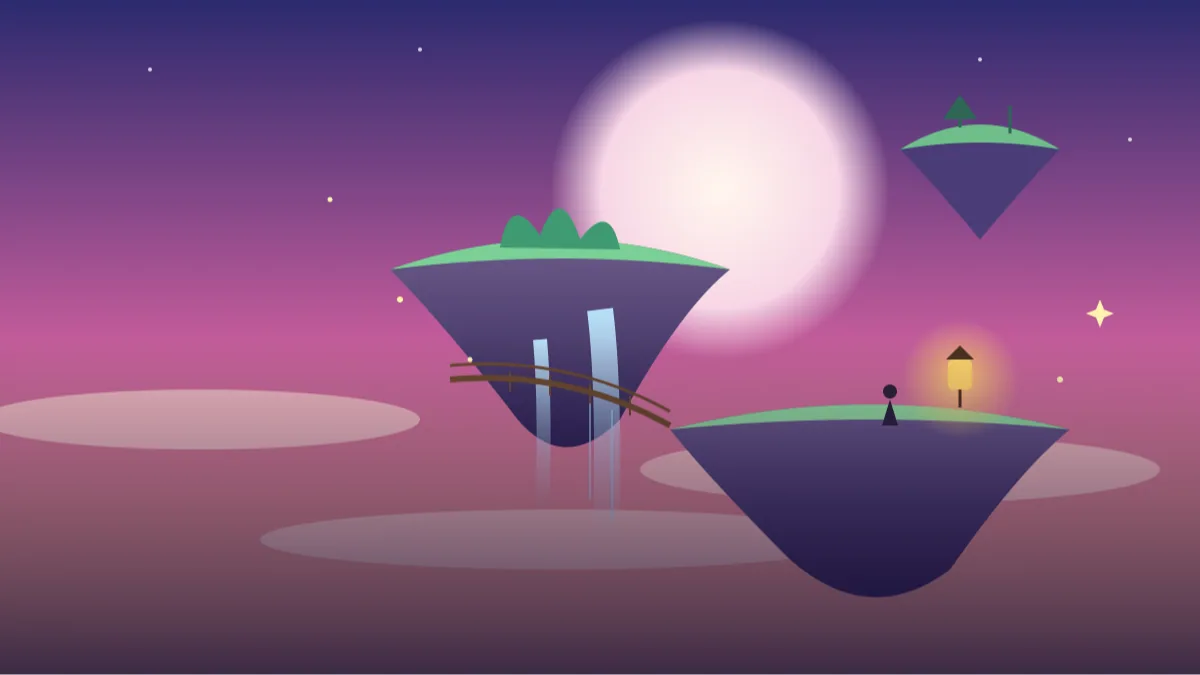
1. Floating islands at sunrise
Create a wide fantasy illustration of floating islands at sunrise.
FOREGROUND: Rope bridge and a small lantern on the nearest island.
MIDDLE: Waterfalls pouring from islands into clouds.
BACKGROUND: Giant pale moon fading into pink sky.
STYLE: Painterly concept art, soft light, vast scale.
AVOID: Text, existing franchises, crowded detail.
Three layers give depth. A tiny lantern gives scale.
2. Glowing forest
Paint a magical forest at night.
FOCAL POINT: A massive ancient tree with softly glowing blue roots.
DETAIL: Floating light particles, mushrooms with gentle glow, a winding path.
SCALE: A tiny traveller with a lantern at the base of the tree.
STYLE: Atmospheric concept art, deep teal and gold.
AVOID: Horror mood, text, existing characters.
One colour of glow keeps the scene harmonious.
3. Castle above the clouds
Illustrate a white stone castle perched on a mountain above the clouds.
DETAIL: Tall spires, banners without symbols, a winding stairway carved into the rock.
LIGHT: Golden sunset hitting the towers from the side.
SKY: Sea of clouds beneath.
STYLE: Epic but gentle fantasy painting.
AVOID: Text, dragons, existing franchises.
Side light on spires gives crisp edges and drama.
4. Underwater city
Create an underwater fantasy city.
ARCHITECTURE: Coral-shaped towers and glass domes connected by bridges.
LIGHT: Sun rays piercing the water, glowing jellyfish lights.
LIFE: A school of colourful fish, a large friendly whale far away.
PALETTE: Turquoise, coral and soft gold.
STYLE: Painterly concept art.
AVOID: Text, humans close up, dark mood.
A distant whale shows how big the city is.
5. Floating market
Illustrate a busy floating market among tall cliffs on a river.
DETAIL: Wooden boats with colourful canopies, fruit stacks, hanging lanterns, no readable signs, ropes tying the boats together.
PEOPLE: Small faceless figures in the distance, none close to the camera.
LIGHT: Warm morning haze with soft shafts of sun.
STYLE: Rich storybook fantasy, gentle colours.
AVOID: Text, close-up faces, clutter at the front.
Faceless figures avoid awkward faces and keep the scene clean.
6. Cosy wizard study
Create a cosy fantasy study inside a round tower.
DETAIL: Crooked bookshelves, floating candles, a telescope pointing at a skylight, a sleeping owl on a perch, a blanket and a steaming teapot on a small table.
LIGHT: Warm candle glow, cool moonlight through the window.
STYLE: Detailed storybook illustration.
AVOID: Text on books, dark mood, existing characters.
Cosy fantasy has a big audience. Include comfort items like blankets and tea.
7. Desert crystal ruins
Paint ancient ruins in a desert with giant glowing crystals growing through the broken stones.
SKY: Twilight with two moons and a few faint stars.
FOREGROUND: Wind-swept sand ripples and a lone traveller in a cloak, seen from behind, very small.
PALETTE: Amber sand, violet crystals.
STYLE: Cinematic concept art.
AVOID: Text, existing franchises, gore.
Warm ground against cool crystals gives instant contrast.
8. Snowy village festival
Illustrate a snowy mountain village celebrating a lantern festival.
DETAIL: Hundreds of floating paper lanterns rising into the sky, snow-covered rooftops, warm glowing windows, smoke from chimneys.
PEOPLE: Tiny silhouettes gathered in the village square.
PALETTE: Deep blue night with warm orange lights.
STYLE: Soft storybook fantasy.
AVOID: Text, close-up faces.
Warm lights on cool blue make every scene feel magical.
One focal point, three details and a tiny figure: building a fantasy scene prompt
Decide your focal point first: a tree, a castle or a city. Then add three supporting details and one small figure for scale. Finish with light and style. That is the whole recipe, and most weak pictures come from skipping one of the steps.
Skip long lists of objects. Too many ideas fight for attention and the picture becomes noisy. If you catch yourself writing 'and also a dragon, and also a waterfall', stop and keep only the thing that tells the story.
Write the light as a place, not an adjective. 'Warm lantern glow on the rope bridge, cold blue mist below' gives ChatGPT something to draw. 'Magical lighting' gives it nothing.
Pasting it into ChatGPT: ratio, wide shot first, close-ups later
Paste your prompt, set a ratio such as 16:9 for wallpapers or 2:3 for book covers, and generate. Ask for variations: 'same scene at night' or 'closer view of the bridge'. Always start with the wide establishing shot, because it sets the palette you will reuse.
Then request close-ups of favourite areas, and say 'keep the same colours and building shapes as the previous image'. It will not be perfect, but it helps.
Save the prompts that work as templates, with one line about what they produced. Next time you want a night version, you will not need to rethink anything.
- Start with the wide establishing shot.
- Then request close-ups of favourite areas.
- Keep a consistent palette across images.
- Save the prompts that work as templates.
Why your fantasy scene prompt looks like every other fantasy picture
A very common issue is a generic 'fantasy landscape' that looks like a thousand others. Add unusual specifics: the glowing roots, the rope bridge, the two moons. The more oddly particular your detail, the less generic the picture.
Another is muddy colour. Limit the palette to two main hues, say teal and amber, and let the rest be neutral. Muddy images usually have five competing colours.
Avoid asking for logos, banners with writing or known characters. Besides spelling trouble, famous characters belong to other people, and your own invention will be more memorable anyway.
What to do with your fantasy art once it works
Use images for story covers, tabletop game maps, wallpapers or blog headers. A series of fantasy landscape ai prompt results with matching colours can illustrate a whole short story, one picture per chapter.
Print them large; atmospheric scenes look great as posters, but check the picture at full size first, since small details can look soft when enlarged.
If you share the art online, say that it was made with AI. If you plan to sell it or use it commercially, read the tool's current terms, because rules differ between tools and change over time.
Thirty-second check: did your fantasy scene prompt really work?
When the image appears, do not just say 'wow' and move on. Spend thirty seconds checking a few things, because they decide whether your fantasy scene prompt really worked. First, find the focal point. Can you say in one sentence what the eye lands on first? If the answer is 'a bit of everything', the scene is too busy and you should cut a supporting detail.
Second, look at the small figure or lantern you asked for. It should be tiny compared with the main structure. If the traveller looks as big as the tree, scale has failed, and the fix is to write 'the traveller is less than one percent of the image height'. Third, check the light. Glow from roots, windows or candles should fall on nearby surfaces. When a lantern glows but nothing around it is lit, the image feels pasted together.
Fourth, zoom into bridges, stairs and railings. Fantasy art often hides broken geometry there: stairs that lead nowhere, a bridge attached to thin air. A little of this is charming in dreamy art, but for fantasy concept art for stories or a book cover you want the structure to make sense. Ask ChatGPT to regenerate with 'clear, connected stairs and bridges' and compare.
Floating islands, three ways: calm, mysterious and wallpaper-sized
Let us take the first prompt, floating islands at sunrise, and bend it into three different moods. This is how one template becomes a whole set of fantasy wallpaper prompts for your phone and laptop.
Version one, calmer and warmer: replace 'pink sky' with 'peach and cream sky', change 'giant pale moon' to 'a low sun behind thin clouds', and add 'birds in the far distance'. The result feels like a quiet morning, good for a story opening.
Version two, moody and mysterious: swap the sunrise for 'blue hour before dawn', make the lantern the only warm light, and write 'mist between the islands'. Now the single lantern becomes the emotional centre of the picture.
Version three, tall and vertical for a mobile screen: say 'portrait 9:16, islands stacked vertically with a waterfall running the full height, empty sky in the top third'. That empty sky is where your clock and icons sit, so the wallpaper stays readable.
Notice that we never rewrote the whole prompt. We changed the light, one object and the framing. Keeping edits small helps you learn which words produce which effect, and you can reuse the same trick on the glowing forest or the dreamy castle illustration prompt style of image.
Where ChatGPT still struggles with fantasy worlds
It helps to be honest about limits so you do not waste an evening. Consistency across images is the biggest one. If you build a village in picture one and ask for a closer view in picture two, the roofs, windows and colours will often shift. For world building art with chatgpt, write a short 'style bible' of three lines (palette, building shapes, light type) and paste it at the start of every request.
Text is another weak spot. Banners, shop signs and book spines turn into nonsense letters, which is why our prompts say no readable signs. If you need a title, add it later in a free editor such as Canva.
Crowds and hands also go wrong when you ask for many people close up. Keep figures small, distant or seen from behind. And remember that every result is a fresh attempt, so if the first one is weak, change one detail and run it again rather than writing a longer prompt.
One more practical habit: keep a small folder of every result you like, even the imperfect ones. Later you can open two of them side by side and notice which words you used. Over a week this becomes your own private guide to fantasy landscape ai prompt writing, and it is far more useful than any list of magic words.
Frequently Asked Questions
How do I make fantasy scenes feel big?
Add a tiny figure or building in the foreground and layers of fading distance behind it. Scale comes from contrast, so write the traveller's size as a fraction of the picture, like 'less than one percent of the image height'.
Can I add characters from books or games?
We recommend original ideas. Describe your own characters instead of naming existing ones.
What ratio should I choose?
16:9 for wallpapers, 2:3 for covers, and 1:1 for social posts. Add the ratio in your prompt.
Why does the image look cluttered?
Too many objects were requested. Reduce to one focal point and three supporting details.
Can I use the art for my story?
Usually yes for personal projects like a wallpaper or a school story. If you plan to sell it or put it on a book you publish, check the tool's current terms first, because rules differ between tools and change over time.
Final Thoughts
A strong fantasy scene prompt focuses on one focal point, clear layers and one lovely light source. Pick a world above, change two details to make it your own, and generate a few versions.
A good next step is to take your favourite result and turn it into a phone wallpaper by asking for a tall 9:16 version with empty sky at the top. If you enjoy wide imaginary places, browse the other ChatGPT image prompts on Tech Boi Prompt for more ideas.
Note: AI image and text results vary by tool, version and settings. Use only your own photos, avoid copying real people’s likeness, and follow the terms of the AI tool you use.