AI Paper Cut Art Portrait Prompts
 AI PHOTO PROMPTSAI PAPER CUT ART8 COPY-PASTE PROMPTS
Walk into any craft market and you will find shadow boxes: thin sheets of coloured paper cut by hand, stacked in layers so the scene seems to float. A clear paper cut art prompt lets you get that same handmade charm from your own photograph, with soft shadows between each layer and crisp scissor-cut edges.
What makes this style special is depth. Each colour is a separate sheet, and the gaps between them cast tiny shadows. If you only write 'paper art', the tool often gives you a flat illustration. So our prompts mention layers, lighting from the side and the number of paper sheets, which pushes the result toward a real 3D papercraft look.
As usual, attach your own photo and ask for the face to stay recognisable. Paper cut style simplifies details, so features become shapes. A few attempts will show you how much simplification you like. Results vary between Gemini and ChatGPT, and that is part of the fun.
- Copy-Paste Prompts
- Why a paper cut art prompt needs the word layers
- Gemini or ChatGPT: try the same text in both and compare
- Colour and texture tips for a layered paper portrait AI result
- Why does my paper art come out flat or fuzzy?
- Swap the theme, keep the layers: handmade paper layers prompt ideas
- Gifts, cards and wall posters from a paper portrait
- Shadows, edges, layer count: checking a paper cut art prompt result before printing
- A worked example: turning the cherry blossom portrait into a birthday card
- FAQs
Copy-Paste Prompts: Paper Cut Art Prompt (8 Ready Ideas)
1. Layered Paper Shadow Box Portrait
SUBJECT: Use my attached photo and keep my face shape, hairstyle and expression recognisable as simplified paper shapes.
OUTFIT: Shirt cut from deep blue paper with a slightly different blue collar layer.
SETTING: Rectangular wooden shadow box, six stacked layers of cream, peach and orange paper behind me.
LIGHT: Soft light from the upper left, small cast shadows between every layer.
CAMERA: Straight-on shot, slight depth of field.
STYLE: Handmade paper cut art, visible paper fibre texture, clean scissor edges.
AVOID: Glossy plastic look, text, photo realism, thick outlines.
The 'six stacked layers' line is the key to depth. Ask for eight layers for more complexity.
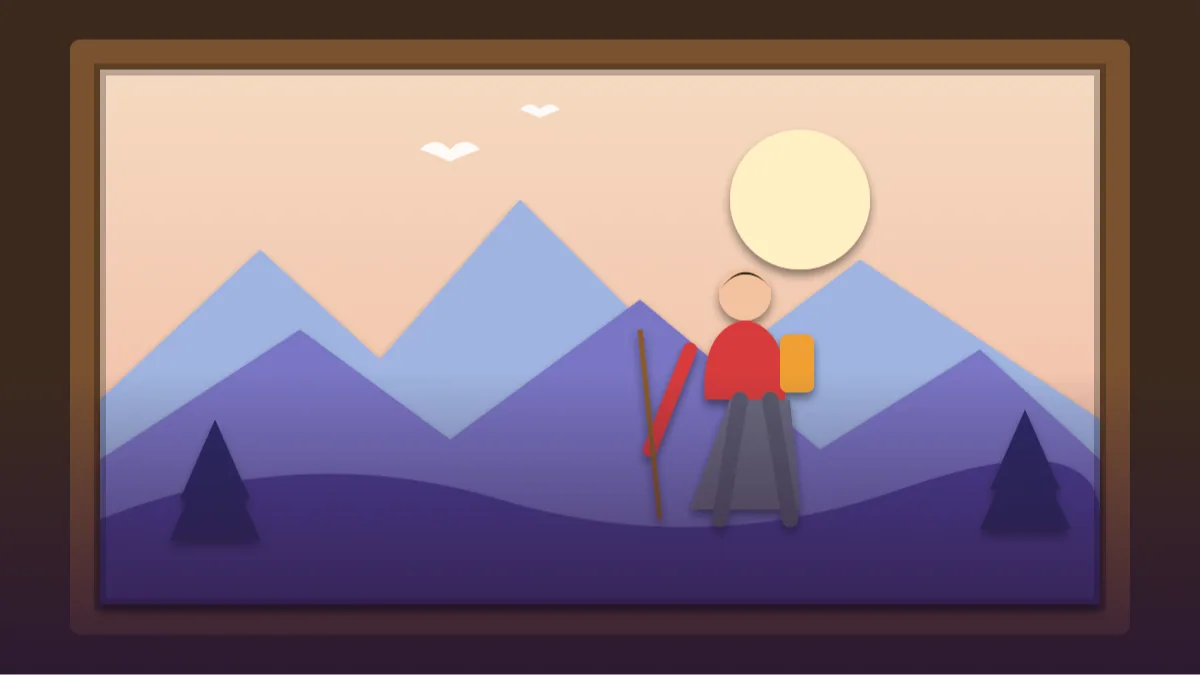
2. Paper Cut Mountain Hiker
SUBJECT: Use my attached photo, keeping my face recognisable as a paper cut figure walking with a small backpack.
OUTFIT: Red jacket, grey trousers, each a separate paper piece.
SETTING: Layered paper mountains in blue, purple and white, a paper sun and a few paper pine trees.
LIGHT: Gentle side lighting with soft shadows under each ridge.
CAMERA: Wide frame, symmetrical depth, slight top-down angle.
STYLE: Paper craft diorama, tidy cut edges, matte paper texture.
AVOID: Smooth gradients, glossy surface, text, realistic photo look.
Hard edges and flat colours keep it authentic. Soft gradients are a giveaway for digital art.
3. Festival Lantern Paper Scene
SUBJECT: Use my attached photo, face recognisable in simplified paper cut form, holding a paper lantern.
OUTFIT: Modest festive kurta in orange and maroon paper layers.
SETTING: Night scene with paper stars, paper marigold garlands and a glowing paper moon.
LIGHT: Warm backlight behind the layers creating a golden glow along the paper edges.
CAMERA: Centred portrait, shallow depth with layers softly separated.
STYLE: Illuminated paper cut lightbox art, rich textures.
AVOID: Religious figures, text, realistic skin, flat shading.
Lightbox style looks stunning at night. Swap colours to suit the festival.
4. Cherry Blossom Garden Portrait
SUBJECT: Use my attached photo, face recognisable as paper layers, seated on a small bench.
OUTFIT: Light pastel top cut from soft pink paper.
SETTING: Layered paper cherry branches with blossoms, pale pink and white sky sheets, falling petals as tiny paper bits.
LIGHT: Soft diffused daylight with gentle layer shadows.
CAMERA: Centred medium shot, shallow depth effect.
STYLE: 3D papercraft, matte texture, subtle paper grain.
AVOID: Neon colours, glossy shine, text, cluttered blossoms over the face.
A calm and cheerful palette. Keep petals away from the eyes to protect the likeness.
5. Underwater Paper Ocean
SUBJECT: Use my attached photo, face recognisable in paper cut shapes, swimming calmly with a snorkel mask pushed up on the forehead.
OUTFIT: Teal swimsuit top shown as layered paper.
SETTING: Stacked blue and turquoise paper waves, paper fish, coral and seaweed cut in layers.
LIGHT: Soft light from above, small shadows beneath each sheet.
CAMERA: Wide frame with strong layer separation.
STYLE: Papercraft shadow box, handmade fibre texture.
AVOID: Realistic water, glossy shine, text, sharks, scary elements.
Stacking waves in different blues makes the depth obvious even at thumbnail size.
6. City Rooftop Paper Silhouette
SUBJECT: Use my attached photo, face recognisable as a layered paper figure leaning on a rooftop railing.
OUTFIT: Dark jacket piece with a light scarf layer.
SETTING: Paper skyline in layers of purple, blue and black, tiny punched windows glowing yellow, a paper crescent moon.
LIGHT: Warm light from behind the window cut-outs, cool ambient light on the front.
CAMERA: Straight-on, slightly low angle.
STYLE: Layered paper cut art, crisp edges, matte surface.
AVOID: Gloss, readable signs, text, photorealism.
Punched window holes with back light look charming. Ask for more or fewer windows.
7. Garden Tea Time Scene
SUBJECT: Use my attached photo, face recognisable as a paper cut figure sitting at a small round table.
OUTFIT: Simple green shirt cut from textured paper.
SETTING: Paper garden with leaves, a tiny teapot and two cups, trellis and flowers in layered colours.
LIGHT: Soft morning light, shallow shadows beneath each layer.
CAMERA: Centred, three-quarter view.
STYLE: Handmade paper craft illustration with realistic layer depth.
AVOID: Glossy finish, text, cluttered table, thick black outlines.
A relaxed lifestyle idea. Add a paper cat in the corner if you like small surprises.
8. Paper Cut Name Frame Portrait
SUBJECT: Use my attached photo, face recognisable as paper cut shapes in a circular frame.
OUTFIT: Shirt in two tones of teal paper.
SETTING: Round frame made from ten concentric paper rings in warm gradient colours, small paper leaves around the border.
LIGHT: Even soft top light, thin shadows between rings.
CAMERA: Perfectly centred, straight-on.
STYLE: Neat papercraft badge, matte paper texture, crisp edges.
AVOID: Lettering, glossy shine, uneven circles, extra faces.
The circular design suits profile pictures. Keep text out and add your name later in an editor.
Why a paper cut art prompt needs the word layers
Ask any papercraft artist what makes their work feel alive and they will say shadow. Each sheet sits slightly above the last, and a thin shade falls between them. To get this effect from an AI tool, we need to describe the structure: how many layers, where the light comes from, and what colour each sheet is.
A good paper cut art prompt reads almost like a recipe for a craft project. It tells the tool what is on the front layer, what sits in the middle, and what forms the backdrop. You will notice the images feel more tactile when the prompt includes the words matte, fibre texture and scissor-cut edges.
Gemini or ChatGPT: try the same text in both and compare
The workflow is simple, and it is nearly identical in both tools. We like to try the same text in each app, as a Gemini paper cut portrait may look neater while a ChatGPT papercraft style photo often has stronger lighting.
- Upload a clear, front-facing photo with good light.
- Paste a prompt and adjust the colours to match your taste.
- Send, and check how close the face looks to you.
- If the style drifts to illustration, add 'real paper, photographed, with physical shadows'.
- Ask for a different palette using the same prompt for quick variations.
Colour and texture tips for a layered paper portrait AI result
For a believable layered paper portrait AI image, limit your palette. Four or five related colours look elegant, while ten random colours look messy. Pick a warm family such as peach, orange and maroon, or a cool family such as teal, navy and white.
Texture is the other half. Real paper has tiny fibres and slight edge shadows. Mention 'matte paper grain' and avoid words like glossy, shiny or metallic, which push the AI toward plastic.
- Use light colours at the back and darker ones at the front for depth.
- Mention 'hand-cut' to invite slightly imperfect edges.
- Ask for 'soft shadows, not black outlines'.
- Try gold or silver paper accents for festive images.
Why does my paper art come out flat or fuzzy?
The first mistake is leaving the style vague. 'Paper art' might give you an origami swan or a flat vector. Use 'layered paper cut shadow box' instead. The second is too much detail. Papercraft simplifies, so avoid asking for realistic pores or fine hair strands.
If the face loses likeness, simplify the background so the tool spends effort on features. A third problem is gradients. Real paper does not have smooth colour fades, so remove words like gradient and glow unless you want the lightbox style.
Lastly, keep expectations flexible. Some tries will look more like an illustration than a craft. Retry with the same prompt and pick the one that has the best shadows.
Swap the theme, keep the layers: handmade paper layers prompt ideas
Once you like the structure, swap the theme. A handmade paper layers prompt can show a monsoon street, a wedding gate in neat colours, a cricket ground or a school festival. Change the colour list, the main prop and the background layers, and keep the rest of the text exactly as it is.
You can also turn the same portrait into a set of three or four images, all in the same palette, for a consistent gallery. That looks lovely on a profile grid, especially when each picture uses the same sheet colours and the same light direction. Do not change the palette between pictures; the set will look like a random mix instead of one craft project.
Gifts, cards and wall posters from a paper portrait
Paper art fits gifts, cards and posters. You can print it for personal use on matte paper, set it as a phone wallpaper, or share a before and after beside your original photo. A birthday card for a cousin or a thank-you card for a teacher feels special when the picture looks handmade.
Use the highest resolution the tool gives you and zoom in before printing, because the odd extra layer or wrong shadow is easy to miss on a phone screen. If you are not sure about a caption, borrow one of these:
- Cut, stacked and layered into a portrait.
- No scissors were harmed in the making of this.
- Which layer is your favourite?
- My life in six sheets of paper.
Shadows, edges, layer count: checking a paper cut art prompt result before printing
Check the shadows first. In real papercraft, each shadow is soft and narrow, darkest where a sheet sits close to the one behind it, and always falling the same way. If the shadows go left on one layer and right on another, the light source is confused, and you should write 'one light from the top left, all shadows fall to the lower right'.
Next, look at the edges. A hand-cut edge has tiny irregularities, but it should never be fuzzy or painted. Count the layers: if you asked for six and see a smooth illustration with two, the depth is missing. Finally, hold your phone at arm's length. A good paper portrait still reads as a face from far away, because the big shapes of hair, forehead and chin are clear. If the face disappears, simplify the background and retry.
A worked example: turning the cherry blossom portrait into a birthday card
Take the Cherry Blossom Garden Portrait. Step one: keep the paper pink blossoms but change the bench to 'a small round cake made of three paper layers with five paper candles'. Step two: change the palette to 'peach, cream and mint green'. Step three: leave a clear empty area on the top third for a message you will add in a design app.
Run it and check the candles: AI may add more than five or give them flames made of glow. If so, say 'flat paper flames cut from yellow paper, no glow'. You now have a card that feels handmade without a single cut.
Frequently Asked Questions
What is a paper cut art prompt?
It is a written instruction asking an AI tool for an image that looks like layered, hand-cut paper with soft shadows. The more it says about layer count, sheet colours and light direction, the more convincing the depth becomes.
Will my face stay the same?
The face is simplified into shapes, so it will not be photographic. If you attach a clear photo and ask to keep the face recognisable, the main features usually survive. Retry if it drifts.
Why does my image look flat?
It is likely missing layers and shadows. Mention 'six stacked paper layers with cast shadows' and light from one side, and depth improves.
Can I print it as a gift?
Yes, for personal use. Make sure you use the highest resolution output, and review the picture closely for odd details before printing.
Is this good for group photos?
It can work, but each added face reduces likeness. Start with one or two people, and only use photos you have permission to use.
Final Thoughts
Papercraft is slow and careful in real life, but with a good paper cut art prompt you can get a similar charm in minutes. Choose a limited palette, ask for layers and shadows, and keep the face simple. Those three choices matter more than any fancy word.
Begin with the Layered Paper Shadow Box Portrait and print one small copy to see how the layers look in your hands. If you want a festival version, try the lantern scene and browse our other festival photo prompts on Tech Boi Prompt.
Note: AI image and text results vary by tool, version and settings. Use only your own photos, avoid copying real people’s likeness, and follow the terms of the AI tool you use.