AI Double Exposure Portrait Prompts
 AI PHOTO PROMPTSAI DOUBLE EXPOSURE PORTRAIT8 COPY-PASTE PROMPTS
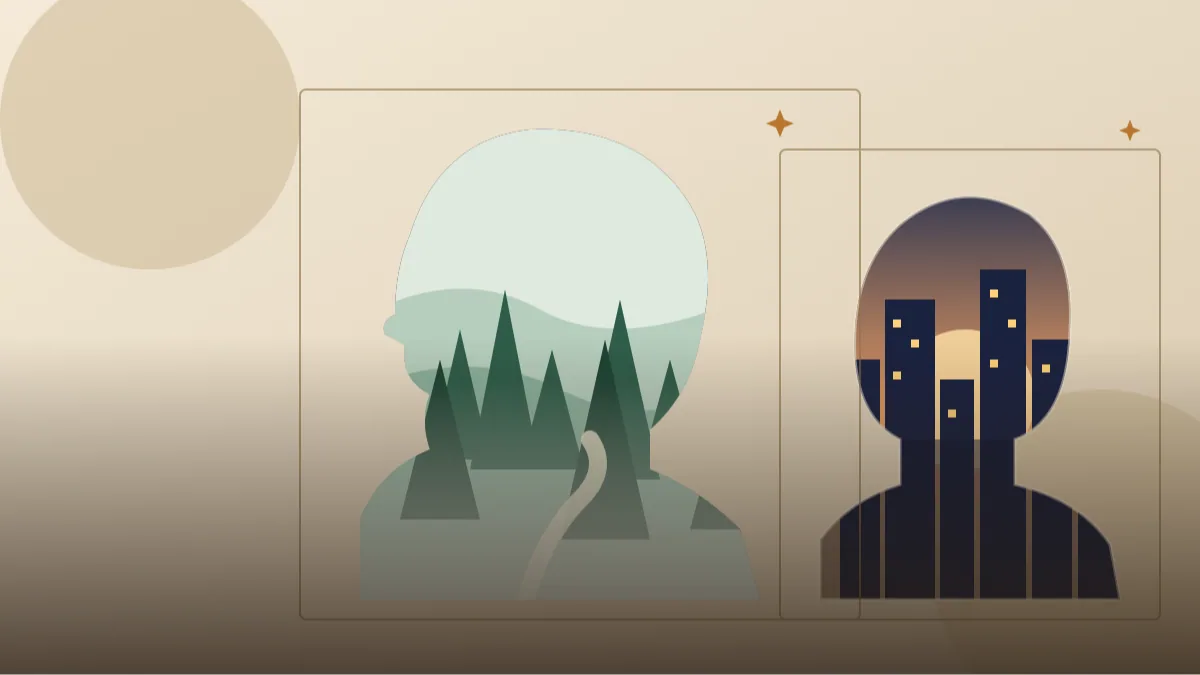
Double exposure began in film cameras, when two pictures landed on the same frame by accident or by design. Today the look is a favourite for posters, album covers and profile pictures: a face in silhouette filled with mountains, waves or city lights. A smart double exposure prompt gets the same effect in seconds from your own photograph.
The idea is simple. One image gives the outline of your head and shoulders, and a second scene shows through inside that outline. The AI needs to know which shape is the master, which scene fills it, and how bright the background should be. That is where most beginners stumble, so every prompt below spells these things out.
Attach your own side-profile or front-facing photo and ask the tool to keep your face shape recognisable. The effect is artistic, so some blur and abstraction is part of the charm. Expect a few attempts before the blend looks just right.
- Copy-Paste Prompts
- How a double exposure prompt works in Gemini and ChatGPT
- Picking the right photo for a double exposure prompt
- Balancing face and scenery for a multiple exposure photo effect
- Muddy blends, tilted heads and flat insides: fixing a double exposure prompt
- A worked example: turning the forest silhouette into a travel profile picture
- What a clean double exposure should look like
- Captions and places to use an artistic profile picture idea
- FAQs
Copy-Paste Prompts: Double Exposure Prompt (8 Ready Ideas)
1. Forest Inside My Profile
SUBJECT: Use my attached side-profile photo. Keep my head outline and nose, chin and hair shape recognisable.
OUTFIT: Plain dark top, simple shoulders only.
SETTING: Inside the silhouette, show a misty pine forest with a winding path fading at the neck; outside, a clean pale cream background.
LIGHT: Soft diffused morning light, gentle gradients.
CAMERA: Centred medium close-up, symmetrical balance.
STYLE: Double exposure art, smooth blend, fine detail inside the shape.
AVOID: Messy edges, text, extra faces, harsh colours.
A pale background keeps the silhouette bold. Switch to pine mountains for a colder mood.
2. City Skyline Night Blend
SUBJECT: Use my attached photo, front-facing, and keep my face unchanged and clearly readable.
OUTFIT: Dark jacket collar.
SETTING: Fill the upper head and shoulders area with a glowing city skyline at dusk, towers and lit windows fading softly into the face; background plain deep navy.
LIGHT: Warm window lights and a cool blue sky.
CAMERA: Centred head-and-shoulders crop.
STYLE: Multiple exposure photograph, cinematic, balanced contrast.
AVOID: Readable signs, extra people, text, cartoon look.
Keep a few lines of the face visible, such as eyes and jaw, or the portrait gets lost.
3. Ocean Waves and Gulls
SUBJECT: Use my attached side-profile photo and keep my features recognisable.
OUTFIT: Light linen shirt collar.
SETTING: Inside the profile shape, rolling ocean waves under a bright sky with a few distant birds; outside, soft white sky with a faint horizon.
LIGHT: Bright coastal daylight, airy and clean.
CAMERA: Centred close-up, slight space above the head.
STYLE: Double exposure portrait, delicate blue and teal palette, fine foam texture.
AVOID: Boats with names, text, dark murky tones, messy blend.
Blue and white palettes feel fresh and are easy for the tool to keep clean.
4. Starry Night Sky Silhouette
SUBJECT: Use my attached photo and keep my profile unchanged and recognisable.
OUTFIT: Simple dark shoulders only.
SETTING: Inside the head silhouette, show a deep night sky with a faint Milky Way, tiny stars and a thin crescent moon; outside, a pale grey gradient.
LIGHT: Gentle glow from the stars, soft edge light on the profile.
CAMERA: Centred, slightly low angle, big breathing space around.
STYLE: Artistic double exposure, indigo and silver tones.
AVOID: Planets with rings, text, noisy artefacts, over-saturation.
The grey outer background makes the star colours pop. Add a hint of purple for dreamy variety.
5. Autumn Leaves and Road
SUBJECT: Use my attached side-profile photo and keep my face outline unchanged.
OUTFIT: Mustard scarf wrapped neatly, plain coat.
SETTING: Inside the silhouette, a lane lined with golden maple trees and falling leaves, road leading toward the back of the head; outside, a soft warm beige background.
LIGHT: Late afternoon amber glow.
CAMERA: Centred head and shoulders.
STYLE: Double exposure art, warm orange and brown palette, gentle film grain.
AVOID: Text, harsh edges, extra people, cluttered detail.
Warm palettes give a nostalgic feeling, good for profile pictures in autumn.
6. Mountain Range and Sunrise
SUBJECT: Use my attached photo, keep my face recognisable and unchanged.
OUTFIT: Dark hooded jacket, hood down.
SETTING: Inside the head, layered mountain ridges in morning mist with a small sun peeking over the peak; outside, clear soft peach sky.
LIGHT: Sunrise glow with pink and gold gradients.
CAMERA: Centred portrait with symmetrical space.
STYLE: Multiple exposure, calm and hopeful, smooth gradients.
AVOID: Text, snow clutter, sharp unnatural edges, extra faces.
Great for motivation posts. Layered ridges create depth within the silhouette.
7. Flowers and Butterflies Bloom
SUBJECT: Use my attached photo and keep my face and hairstyle recognisable.
OUTFIT: Plain pastel top.
SETTING: Inside the silhouette, a meadow of wildflowers and a few butterflies, roots of the flowers at the shoulders; outside, a creamy white background.
LIGHT: Soft bright daylight, gentle shadows.
CAMERA: Centred head-and-shoulders crop.
STYLE: Delicate double exposure photography, natural colours, fine petal detail.
AVOID: Heavy makeup edits, text, insects crowding the face.
Soft and wholesome. Use fewer flowers if the face starts to disappear.
8. Old Temple Streets Heritage Blend
SUBJECT: Use my attached side-profile photo and keep my profile unchanged and recognisable.
OUTFIT: Simple kurta collar.
SETTING: Inside the silhouette, a narrow old town street with stone arches, hanging lanterns and a distant tower; outside, warm sandy background.
LIGHT: Golden hour, soft glow.
CAMERA: Centred close-up with room around.
STYLE: Double exposure portrait, textured and heritage feel, subtle grain.
AVOID: Religious idols, readable signs, text, crowd.
A heritage theme feels personal. Swap in the architecture of your own city.
How a double exposure prompt works in Gemini and ChatGPT
A double exposure portrait AI image needs two ingredients: a clear silhouette and a scene that lives inside it. When you attach a photo and describe the inside scene, the model draws your outline first and then fills it. The outside background usually stays pale or plain so the shape reads at once.
- Upload a photo with a plain wall behind you, so the outline is easy to detect.
- Paste the prompt and edit the scene inside the silhouette.
- Decide the outside colour: pale for dark interior scenes, dark for bright scenes.
- Generate and look at the edges of the head. Ask for 'clean smooth edges' if they are messy.
- Save the version with the best balance of face and scenery.
Picking the right photo for a double exposure prompt
Side profiles give the strongest silhouettes. The nose, lips and chin make a recognisable shape, and the scene fits neatly inside the head. Front-facing photos also work but need more care, because the eyes and mouth compete with the scenery.
Use a photo with hair pulled back or neat, as messy hair creates fuzzy outlines. A plain wall behind you, soft side light and a straight head position make the model's job easier. Avoid hats and large glasses unless you want them in the final image.
Balancing face and scenery for a multiple exposure photo effect
The beauty of a multiple exposure photo effect lies in balance. If the scene is too strong, you lose the person; if it is too weak, the picture looks like a normal portrait with a faint overlay. Aim for a scene that is visible but softer than the eyes and jawline.
Tell the tool how much of the face should remain, for example 'keep eyes and lips visible while the scenery fills the forehead and hair'. This single line often transforms the result.
- Use gradients, not hard borders, between face and scene.
- Keep the palette to two or three colours.
- Ask for 'high contrast silhouette' for a graphic poster look.
- Add 'fine grain' for a printed-photo feel.
Muddy blends, tilted heads and flat insides: fixing a double exposure prompt
The biggest mistake is asking for too many scenes at once. A forest plus a skyline plus ocean ends up muddy. Pick one idea per image. Another common problem is a distorted head shape, usually from a tilted or cropped source photo. Use a straight, uncropped photograph.
If the interior looks flat, describe depth: foreground, middle ground and background. Mention 'layered' and 'misty' and the picture gains dimension. Finally, if your face disappears completely, repeat the line 'keep my face recognisable' at the end of the prompt too.
A worked example: turning the forest silhouette into a travel profile picture
Say you love hiking and want a profile picture for a travel page. Take the Forest Inside My Profile prompt and replace the pine forest with 'a layered mountain valley with a thin river and a small trail, soft morning mist'. Keep the pale cream background, since it makes the silhouette bold.
Change the outfit line to 'dark hooded jacket collar' for a trekking feel and add 'a few tiny birds near the forehead' for movement. Keep 'face outline recognisable' at the start and the end of the prompt.
If the valley is too bright and hides your jawline, add 'scenery fades to transparent near the nose, lips and chin'. If it feels flat, add 'three layers of ridges, lighter in the distance'. Two small edits turn the same recipe into a silhouette blended with nature prompt that suits your own story.
What a clean double exposure should look like
Judge the picture in three steps. First, squint: you should still see the head outline clearly, even without detail. Second, look at the neck and shoulders, where the scene should fade smoothly into the clothes instead of ending in a hard line. Third, look at the inner scene for sense. Mountains should sit as ridges, not floating triangles, and a skyline should have buildings of different heights.
Check the face for balance. In a double exposure portrait AI image you want the eyes or lips to remain a gentle anchor. If the outside background has stray patches of colour from the scene, ask for a plain, clean outside. Last, zoom in at the hairline, where fuzzy blending is most likely, and ask for smoother edges if needed.
- Silhouette reads clearly at thumbnail size.
- Scene fades gently at neck and shoulders.
- Eyes, nose line or lips stay visible.
- Outside background is clean and uncluttered.
- No random text, symbols or extra faces.
Captions and places to use an artistic profile picture idea
This style is perfect for an artistic profile picture idea, a creator banner, a podcast cover, or even a poster for a small event. Pair it with a short caption, and keep the text outside the image so the silhouette stays clean.
Dark scenes inside a pale outline look good on a white or light feed; pale scenes on a dark outline suit dark mode profiles. Choose according to where the picture will sit.
- There is a whole forest inside my head today.
- Carrying the city wherever I go.
- Sky on the inside.
- Which scene would you put inside yours?
Frequently Asked Questions
Do I need a side profile for a double exposure prompt?
No, but it helps. A side profile gives a cleaner outline, so any double exposure prompt works more reliably. Front-facing photos work too if you keep the scene soft and tell the AI to keep your eyes visible.
Why does my silhouette look blurry?
Blurry outlines come from messy hair or a busy background in the source photo. Use a plain wall and add 'clean sharp silhouette edges' to the prompt.
Can I do this with Gemini and ChatGPT both?
Yes. A Gemini double exposure photo tends to stay closer to the original outline, while a ChatGPT silhouette landscape portrait often has richer scenery. Try both with the same text.
Can I use this style for printing?
You can print it for personal use, but check the image resolution first. AI images can look soft when enlarged, so use the highest quality option available.
Can I use a photo of a friend?
Only with their permission. We recommend using your own photos, and sharing only what the person in the picture is comfortable with.
Final Thoughts
Double exposure turns a simple portrait into a small piece of art. With a well-planned double exposure prompt, a clear photo and a little patience on edges and balance, you can place a whole forest, a city or a sky inside your own profile.
Start with the forest or the starry night, because they are forgiving, then try the more detailed city and heritage blends. Then share two versions on your profile and see which silhouette people pick. If you want more creative portrait looks, the other AI portrait styles on Tech Boi Prompt are a playful next step.
Note: AI image and text results vary by tool, version and settings. Use only your own photos, avoid copying real people’s likeness, and follow the terms of the AI tool you use.